Ah another weekend is upon us…

And I’m well equipped for this weekend, I’ve got two fun activities to do:

  1. Go camp out in http://social.technet.microsoft.com/Forums/en-US/sharepointgeneral/ and ambush people asking simple SharePoint questions – going to aim for two badges – don’t really know how long that will take.
  2. Peter Gfader introduced me to http://projecteuler.net/ I’m up to question 3 and decided to solve them using a combination of FireFox + FireBug Console and JavaScript (ECMAScript)

serverfault.com hasn't launched and I hate it already

http://serverfault.com/ launched, and I hate it already.

edit: SF.com is Open to Public, so this should have read: serverfault.com hasn't launched yet and I hate it already

It’s basically http://stackoverflow.com/ for sys admins.  Great in concept, and probably a well-requested idea by SOers to keep SO pure… 

But then you’ve got guys like me.  I’m not a pure developer.  I’m a knowledge sponge.

I want to know everything to do with SharePoint, because I know there’s a lot that I don’t know, so anything new to read is awesome.

And now, I’ve got one extra place I have to check.

  • StackOverflow search RSS
  • SharePointMVPs twitter
  • MS SP General Forums RSS
  • Various MVP blogs
  • SP Team Blog
  • don’t want ServerFault.com

So…

SharePoint Configuration – SF.com
SharePoint Application Development – SO.com

And possibly the worse part of it is that I now have 2 reputations to grind – this is just like another WOW reputation grind.

FAIL FAIL FAIL!


Already, people are asking:

http://serverfault.com/questions/7384/site-collections-in-sharepoint-2007-how-many-and-why

Great questions, but I hate having to check two places.  Why couldn’t they just stick a tag on SO just baffles me…

Who came up with this stupid idea anyway!


What’s next?

http://ArchitectureInstability.com for architects?


Anyway, if you are a sys admin and never wants to see a line of .NET code, feel free to head over and never see SO again – but as for me…

</3 ServerFault.com
SharePoint: MOSS SP2 Major Bug

The SharePoint Team blog announced a major bug with SharePoint MOSS SP2:

This is funny, but extremely serious and important.

During the installation of SP2, a product expiration date is improperly activated. This means SharePoint will expire as though it was a trial installation 180 days after SP2 is deployed. The activation of the expiration date will not affect the normal function of SharePoint up until the expiration date passes. Furthermore, product expiration 180 days after SP2 installation will not affect customer’s data, configuration or application code but will render SharePoint inaccessible for end-users.

http://blogs.msdn.com/sharepoint/archive/2009/05/21/attention-important-information-on-service-pack-2.aspx

  • Does not affect data
  • But it will silently deactivate after 180 days
  • Users can come to work without warning and SharePoint will be unavailable.
  • If you are installing SP2 - apply hot-fix from MSDN immediately afterwards.

Get the word out.

SharePoint – InfoPath /cache clearall

So continuing my InfoPath self education.

  1. I publish a new version of the InfoPath form to the Forms Library
  2. I then create a new form based on this template
  3. In Browser – I see the new form
  4. In InfoPath – I see the old form

So it appears that InfoPath is caching the older version of my template and using that.

  • I clear the internet temporary files - didn't do it

A quick search lead me to this explanation: http://blogs.msdn.com/michael_yeager/archive/2008/07/09/infopath-cache.aspx

And sure enough,

start –> run –> InfoPath /cache clearall

Indeed clears out my cache, and now when I create a new form from SharePoint it is using the latest template

What befuddles me is that Michael Yeager says that InfoPath should be checking the version automatically so I don’t understand why it wasn’t doing that.

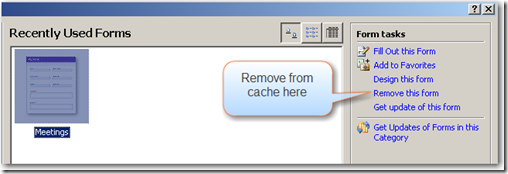
Here’s another more user-friendly way of removing a form from cache

File –> Fill out a form…

image

You can also "Get update of this form" from this dialog.

SharePoint – InfoPath / Forms Library missing

Testing InfoPath, I try to do the simplest thing – publishing an InfoPath form to a SharePoint as a template, and allowing it to create a new library based on this template - I got this error:

The following computer running windows SharePoint Services does not contain the required InfoPath form template:
http://vm-spdev-xxxx/
A generic form template will be used instead

Warning: This is very bad

You should not continue – because if you do…

  1. InfoPath will create a new Document Library instead of a Forms Library and deploy the InfoPath file as a template in this document library. 
  2. It will appear as if everything’s working – you can do New –> InfoPath Form (as a document), fill it out and save it back to the list.
  3. And when you want to update the template it will complain that the default document isn’t based on a Form template.

    InfoPath failed to publish because the default content type in the document library is not based on the Form content type
  4. You got confused – you went to check the Library and sure enough it says the default content type is a Document
  5. You add a Form content type, and switch it over as the default content type… only to discover SharePoint now publishes two different sets of columns in this list – one set for Forms, another set for Documents.
  6. And it doesn’t appear as if the second publish worked…  I think this may be a different problem – because if I view as web page I see the new updated template


Instead, back out right now – delete that list in SharePoint and start over…  By the way… where’s – hmm where’s my Forms Library?


Went to site settings and activated:

  • Site Collection Features –> Office SharePoint Server Enterprise Site Collection features
  • Site Features –> Office SharePoint Server Enterprise Site features

No good, still no forms library.

More stumbling around, finally figured it out – I need to activate:

  • Site Features –> Team Collaboration Lists

Personally I didn’t think this was obvious – but I did know Forms Library is part of WSS…  so may be it made some sense.


Now go back to InfoPath again and try to publish.