IANAL but I understand CC

I understand CC, I think, I am not a lawyer.

I was encouraged by @aeoth's rant on twitter to add a license clarification to my blog, since I've always held the (c) which meant "all rights reserved".  Technically that means you need to discuss with me about the terms of copying materials you found on my site, on each individual basis.  Crazy!

So here's a clarification, ta-da!  Hopefully.

/about-me#legal

Specifically, I ask that:

  1. (-BY) If you are linking or referencing my notes or published code, please provide a link back to either the main site or the permalink.  For blogs and forums these are pretty standard, the only guys that don't do this properly are bots out to plagiarize other people's published work as their own.  For presentations or books, a reference link in the summary slide will be appreciated.
    (-SA) Because I would love to read your improvements on my work, I ask that your content is similarly shared in a open license (openly).  Essentially, if you publish and improve on my work, I would very much like to be able to read it as well.  This applies to published materials: e.g. forums, blogs, PowerPoint presentations, e-books, print.
    Hence, the slightly more restrictive -SA (share alike). 
  2. (-BY) If you are using my published code for production code, the -SA is removed, you may use all code unrestricted with CC-BY, that is, I ask you to link to the permalink in your code comments.  You do not have to share your code back to me.

The spirit of the license is to protect what I feel should be knowledge in the public domain, if you quote someone you should reference them, and if you want to borrow examples or slides from my presentation you should acknowledge it too, but feel free to do so.

At the same time, I don't want to tie anyone down with a restrictive code in their development.  If you need code, found mine, and it solves your problem, leave a link in comments for your colleagues, but you do not have to share your code or change the licensing terms of your code.


That's all, have fun, and I hope the intention is clear.

Finally, a note:

Since I'm not sure if I'm applying a more restrictive license on top of someone else's work by doing this, if I'm quoting your article and for some reason you'd like me to stop, let me know and we can work out what we should do.
SharePoint - Starting Site Workflows Manually

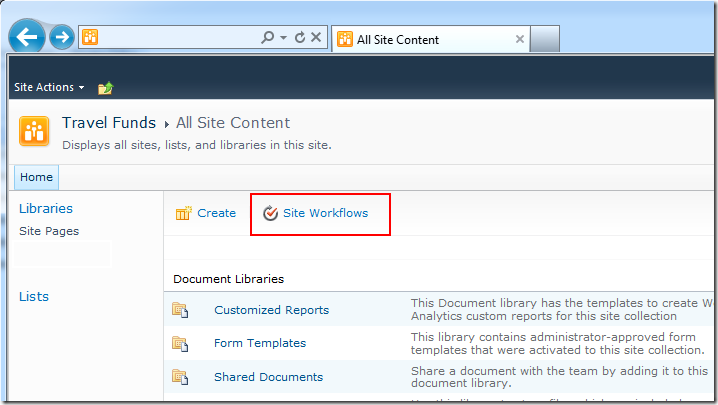
We probably all know that SharePoint 2010 allows you to create a new type of workflow: Site Workflow, these workflows are not bound to a list.  Site workflows are perfect for those one-off jobs that you'd trigger manually.

What's not obvious, to me initially, as well as to many other people, is how does a user actually start one off?

Here's the solution, in one picture, I bet half of you have never noticed this before even though it's always been there from the very beginning.

image

Hacking SP.UI.ModalDialog to download ReportServer PDF

We have a situation where we want to let our users click a report server link, but the report can take (depending on parameters) anywhere between 5 to 30 seconds to create and export as PDF.

Here's how you can "hack" some JavaScript to make the experience better.


Use SP.UI.ModalDialog

function do_modal(url, title, callback) {
    var options = {
        url: url,
        title: title,
        showClose: true
    }
    if (callback) {
        options.dialogReturnValueCallback = Function.createDelegate(null, callback);
    }
    return SP.UI.ModalDialog.showModalDialog(options);
}


This lets me call the Report Server URL via:

var d = do_modal(url, title);

I'm catching the dialog object, because I want to do a few more things.


Pesky IsDlg=1

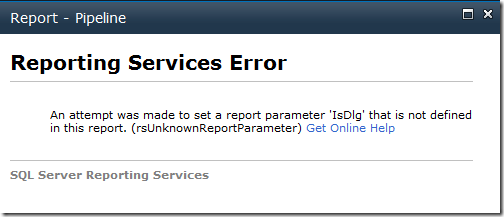
Report Server is very perculiar with the Query paramaters passed in, and SP Modal Dialog likes to add a IsDlg=1 to the query string, this doesn't play well. 

image

"An attempt was made to set a report parameter 'IsDlg' that is not defined in this report.  (rsUnknownReportParameter)"

You can fix this two ways, first, if you have access to report server, you can just add a unused optional parameter IsDlg. 

If you don't have access to report server, you now need to hack the ModalDialog, which is what I did next.


Give me an IFrame, and I will give you a SRC

var f = d.get_frameElement();
f.src = url; // remove IsDlg=1


I ask for the IFrame object created by the dialog, and then brute force the SRC attribute to my url.  This undo the extra IsDlg appended by the ModalDialog.


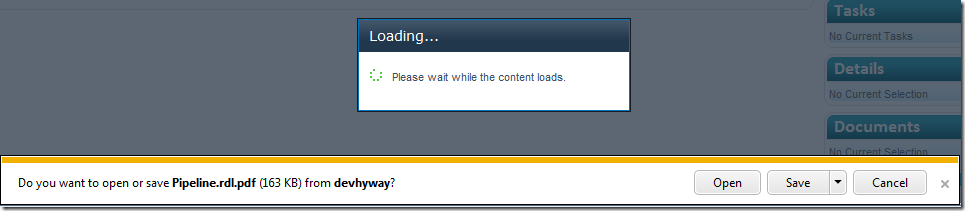
Awesome, my report is now being downloaded, while the user waits with a nice friendly modal popup :-)

image


But wait, hmm, big problem...  screen is stuck

:-(

image

Because the PDF file is downloaded, the browser never receives the signal to stop and dispose the Modal Dialog.  Now the site is stuck.  Which brings us to my final trick.


Manually attach and watch the IFrame, and dispose the dialog when we're done

var t = function() {
    // ready state goes from "loading" to "interactive"
    if (f.readyState != 'loading') {
        d.close(SP.UI.DialogResult.cancel);
        return;       
    }
    setTimeout(t, 2000);       
};

setTimeout(t, 2000);


Let's define a function t, we'll be watching the readyState property of the IFrame object.  When it is no longer loading, we'll close the modal dialog.  Wait and recalculate every 2 seconds until this happens.

Here's the MSDN article on IFrame.readyState

http://msdn.microsoft.com/en-us/library/ms534359(v=VS.85).aspx

One of the more interesting thing is that when you are downloading a PDF, the readyState remains in the "interactive" state, and never reaches the "loaded" state.  This is the reason a loaded() event doesn't fire, and thus the default SharePoint ModalDialog doesn't know we're done and need to fix itself.


Everything in one go:


    var d = do_modal(url, title);
    var f = d.get_frameElement();
    f.src = url; // remove IsDlg=1
    var t = function() {
        // ready state goes from "loading" to "interactive"
        if (f.readyState != 'loading') {
            d.close(SP.UI.DialogResult.cancel);
            return;       
        }
        setTimeout(t, 2000);       
    };    
    setTimeout(t, 2000);

Not many lines of javascript, with an awesome result.

InfoPath - an example of using an XML file for special characters

This is an old trick relating to inserting special characters (such as carriage returns) and tricking InfoPath to stop removing them! 

http://blogs.msdn.com/b/infopath/archive/2005/03/04/385577.aspx

I've decided to take some screenshots to show what you should be expecting when you apply this technique.


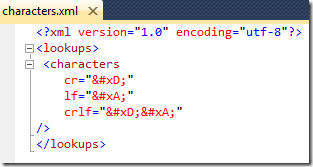
The XML file

image


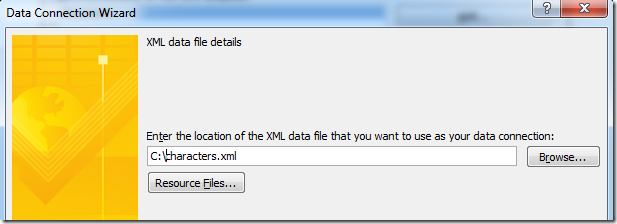
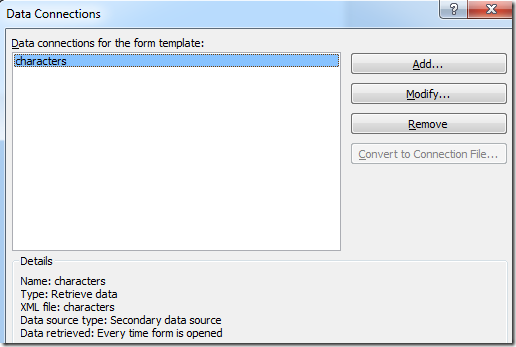
The Data Connection

image

image


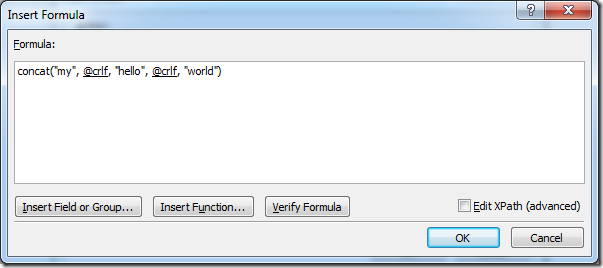
A formula to use it

image

The advanced Xpath is:

concat("my", xdXDocument:GetDOM("characters")/lookups/characters/@crlf, "hello", xdXDocument:GetDOM("characters")/lookups/characters/@crlf, "world")


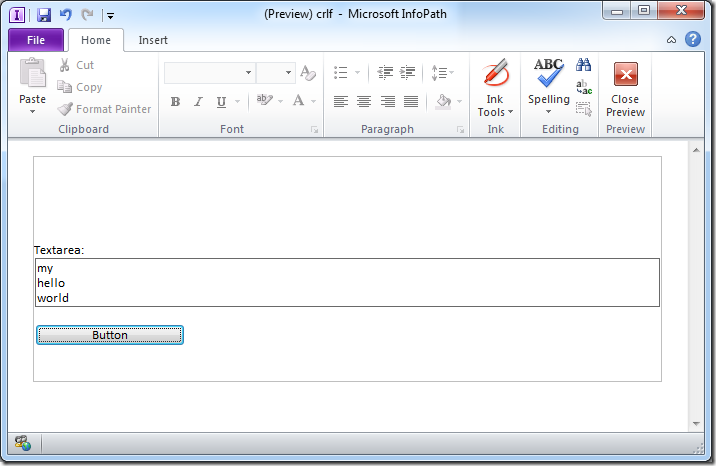
Result - Rich Client

image


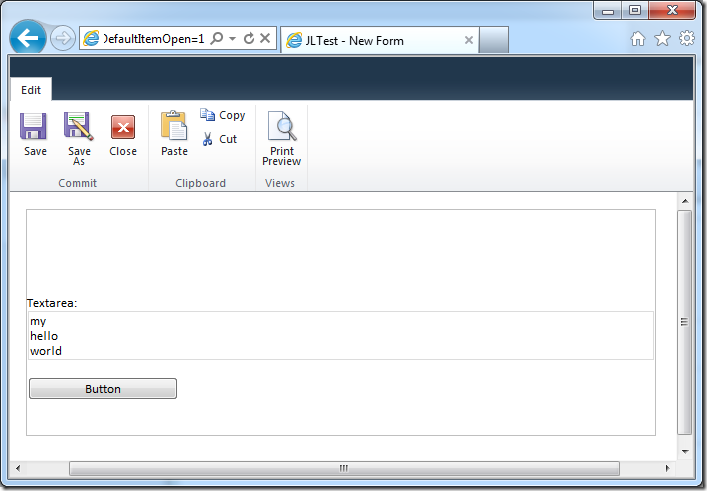
Result - Web Browser Form

image


The HTML generated in the browser form is:

<TEXTAREA ...>my
hello
world</TEXTAREA>


Notice it has the correct carriage returns creating the new lines.


The example XSN file if you want to download it and have some fun

https://static1.squarespace.com/static/5527bff2e4b0b430660b0d10/5527c30de4b030eeeef09715/5527c30fe4b030eeeef0a0ca/1318394572343/crlf.xsn

SPSCBR - REST Service and jQuery AJAX

Climbed out of bed at 4am and drove myself and colleague Jumpei on a laughter-filled trip down to Canberra, where we had lots of fun at the SharePoint Saturday Canberra event.

Our best joke along the drive was debating whether Lake George is a real lake.  Our most scary moment was when the car wouldn't start back up after we took a 10min powernap.


As promised, my slide deck and a zip file of the VS.NET solution that was shown. 

While the concepts are still fresh you should build a rest service and see how this all works for you.  Enjoy :-)

Special thanks to Ishai Sagi who saved the day with an innovative 2-laptop remote-each other and project via SVG port.


Ran out of time, I couldn't cover in more detail...

  • How to pass multiple parameters to REST, via a POST operation - the example is in my script and Rest service, but commented out follow that pattern.
  • jQuery AJAX calls are asynchronous, you can fire 4 requests at the same time and they will run in parallel.  Number of asynchronous calls depends on browser but 4 is a common-minimum.
  • Debugging javascript tips
  • Packaging CSS/JS files in a sandbox solution tips
  • Some consideration and discussions around sandbox solution webpart and quota


Files

Related Links

For 2007, unfortunately you can't easily do REST, but a lot of the SOAP service wrappers are done by awesome people so you don't have to do it yourself.  Thank Marc.