WindowsPhone 7.5 Mango and Office 365


Adding an account

  1. Go to settings | email + accounts | add an account | Outlook
  2. Provide Office 365 login email and password
  3. Once setup, the account will default to the name Outlook (or Outlook #)
  4. In settings | email + accounts, tab the Outlook entry once and you’ll be able to change the name to something more meaningful, like Office 365

Office hub

  1. Now in the Office hub, you can connect to your Office 365 account. 
  2. The first time you login it will open a web browser control and ask you to login.  You can choose to remember login and password to skip this step in the future.
  3. Once authenticated, you’ll see the a view of the lists and document libraries from your Office 365 team site

For those of us keeping itchy to write our own SharePoint - WindowsPhone applications, Microsoft cheated here and the web browser control used in step 2 is accessed via COM to obtain the cookiejar file, which contains the tokens for the Office hub to talk to Office 365.

InfoPath - how to do case-insensitive text compare

Because XML is case sensitive, in InfoPath you have the problem that field may not be equal to another field during text comparison due to their case.

One way that people have been relying on is the TRANSLATE function, which requires you to write really crazy code like this:

translate( /my:fieldx, "ABCDEFGHIJKLMNOPQRSTUVWXYZ", "abcdefghijklmnopqrstuvwxyz" );

Except you usually need to do this for both sides of the equation.


A less well known function is actually the Microsoft extension msxsl:string-compare

http://msdn.microsoft.com/en-us/library/ms256114.aspx

Here you can use this to compare the current user's name.

msxsl:string-compare(my:a_user, xdUser:get-UserName(), "", "i") = 0

The string-compare function will return 0 based on whether the strings are identical.  The 3rd optional argument is language, using an empty string will default to system.  The 4th optional argument is case-insensitive.

The msxsl:string-compare is supported in both InfoPath 2007, 2010 and works in browser forms.

Check it out! :-)

InfoPath – designing verification form

I’m quite a fan of having a validation summary block in InfoPath, similar to how one would have validation in ASP.NET.

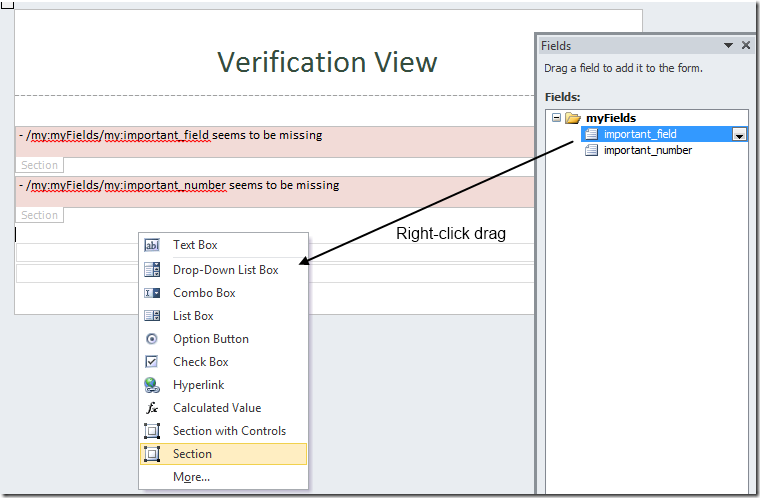
To start, we can create sections directly from our fields.

image

You can right-click drag the fields directly into the designer and select “Section”.  This will create empty sections that are bound to the fields directly.

Put text labels within the sections with a friendly message for each field.  I also made the default background light red.

image

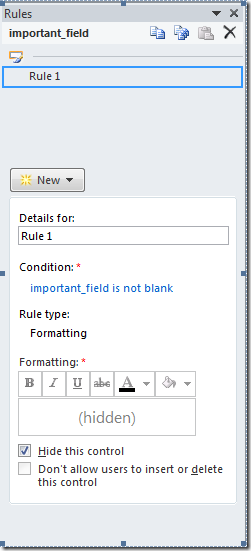
Create validation rules to ensure the field isn’t blank.  Hide the control when they are valid.

image

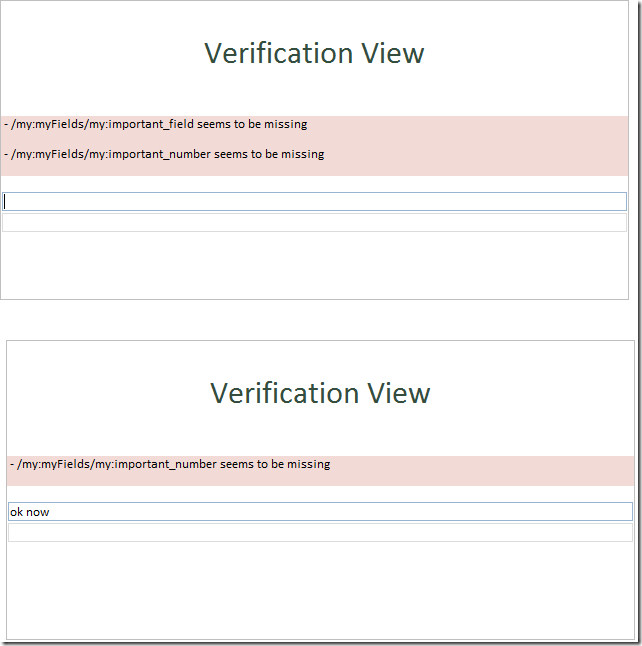
The end result is a pretty view for validation.  When the textbox is blank, the validation warning appears.

SP2010 pretty up mysite with showModalDialog

Disclaimer: Totally, unsupported.

OK, that’s out of the way, let me describe the problem. 

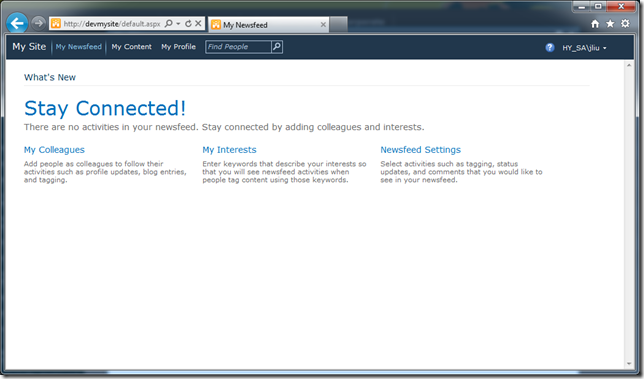
SharePoint 2010 ships with this pretty mysite.  Packed with features.

image


The problem is, your users gets lost.  It doesn’t look anything like your nice branded site.  It doesn’t share the same global navigation.  In fact, users are so lost that they think they are in a place that they shouldn’t be in. 

Result?  They close the browser.


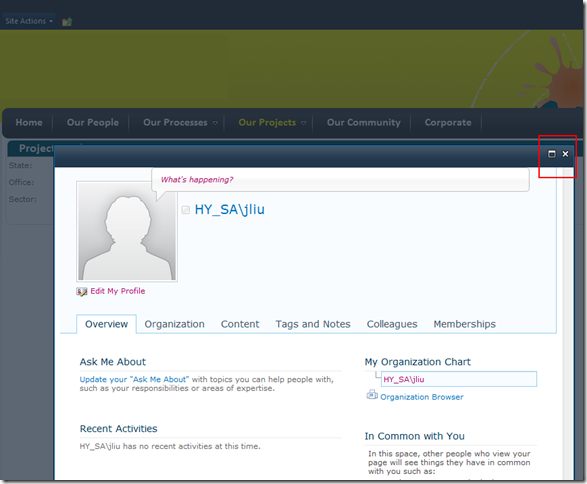
If only we can render our mysite in a SharePoint 2010 showModalDialog, then it would look like this:

image


  • Mysite remains totally un-branded, but now it is just demoted to an utility page
  • Users are familiar with the SharePoint modal dialog, and can easily close the mysite via the top right close buttons.
  • Users don’t feel like they’ve left the site, because they can clearly see the previous page right beneath them.


I did a simple prototype by overriding a SharePoint javascript function:

$(document).ready(function(){

    window.oldSTSNavigate2 = window.STSNavigate2;
    window.STSNavigate2 = function (evt, Url){
        if (Url.indexOf("mysite") != -1) {
            SP.UI.ModalDialog.showModalDialog({
                url: Url + "#",
                title: "My Site",
                autoSize: true
            });
            return;
        }
        window.oldSTSNavigate2(evt, Url);
    };
});

STSNavigate2 is used by these out of the box menus:

image

My Geek Origin story, creativity meets engineering


It all started with…

LEGO

My brother and I grew up around LEGO, dad says that’s because he wanted to play lots of LEGO but couldn’t afford it when he was a kid, so he made sure we had them.  I think LEGO is unique in that as kids, we had to build with our hands what we wanted: MASK, VOLTRON, TRANSFORMERS, Knight Rider’s KITT and its mobile truck, ROBOCOP and ED-209, various Star Wars vehicles… etc.  You see something you wanted on TV or cartoons, you map it out in your mind how you’d build it, and then you build it, with your limited bricks.


PAPER and PENCIL

Mum was the one that gave us paper and pencil, which eventually led us to paper craft.  What we couldn’t do with LEGO, we improvised with our own sketches, scissors and glue, and lots of sticky tape.  With paper we drew secret bases that could withstand a full scale alien invasion, and made worlds, futuristic cities with busy interlocking highways. 

The best part about working with paper was the near-limitless freedom in your creations.  The drawback was how fragile paper was.  You can’t really “play” with the paper models you’ve made.  Yes it’s an awesome model, but god-forbid showing it to your 10 year old nephew.


MUD and LPC

In university, while learning all the wonders of assembly, operating systems and every known Artificial Intelligence method known to man, I fell in love creating MUDs.  A Multi-User-Dungeon is essentially a telnet interface to a world described in text. 

Like a great book, the environments, characters that you interact with are completely within your imagination.  Banish the thought if you think creative writing is easy, read this, and then try to write your entire city without duplication room descriptions.  While modern MMO reuse assets such as an inn (or a cave layout) over and over, we actually have high standards and reusing assets was a sign of sloppy workmanship that’d be rejected during peer review.

The language of choice for me was LPC, an object-oriented variant of C that represented everything in the world as objects.

A person login to this world is given a player object, and moves about in the world via interconnected room (objects).  Each room has X and Y coordinates, so you can work out where that person is in relation to someone else at any point in time.  Hey, we’ve just invented a GPS system.

Players have different races, and whether through racial ability or via magical or technological means, they are able to fly.  To implement flight we gave everyone a Z coordinate, and modified the world so that it constantly applies gravity to pull everyone down to the ground level.  Hey we’ve just invented gravity.

I was watching the animated series Gargoyles and loved how the creatures can’t fly, but can glide once they climbed enough height and leap off, say a clock tower.  Added soaring and swopping – hey, we’ve just invented aerodynamics and gliding.


Computers are the ultimate tool for a creative mind – you are only limited by your imagination, and not by the bricks that you don’t have.  In my world, when I say there will be something, it comes into being.

This is my Geek Origin story.  

:-)