Silverlight + SharePoint 2010 - did you just deploy customizations to SharePoint via the document upload?

Just finished my presentation earlier tonight in SDDN regarding Silverlight and SharePoint.  I had some initial reservations whether true Silverlight people want to even know about SharePoint, but I was pretty blown away by their feedback, interesting questions, and I think they found the session insightful. 

This is good :-)


I think I delivered my first "shock and awe" when people first saw me deploy to SharePoint.  I finished building my XAP file, and then browsed over to SharePoint, selected my Shared Documents library, clicked upload files (and for additional effect, used the drag & drop upload facility in SharePoint 2010).  Before you knew it, I had the XAP file in my document library, and I'm adding a Silverlight web part and configuring the XAP URL.

For comedy effect, I was pretending as if this is business as usual.

You guys were too good and picked it up right away - it was just too magical.  Hold on a second!  Did you just by-passed all the system admins and deployed customization code to your SharePoint server

The absolutely correct answer is, no, not really, I just deployed customizations to the SharePoint UI, an additional tool if you will, that will help you do your job easier.  Technically, it is not running on the server.  Technically, you can run a separate .NET exe tool to work against SharePoint via the same web services and it can do similar things.

Depending who you are, this might be too magical, and thus, way too dangerous.  I think the thought falls into two categories, and I'm hoping by discussing this, we can compare some thoughts on the PROs and CONs of deploying Silverlight to SharePoint.


PRO

  • Bypass system admins
  • Can rapidly develop and test.  Can rapidly update new version
  • Can create simple tools and install them on SharePoint quickly
  • Deploy to SharePoint online

CON

  • Unsafe code, is still unsafe
  • I can deploy a Silverlight webpart that will take my boss' permissions and copy sensitive data to a public location


I suggest a compromised workaround for Production SharePoint

  • Block upload of *.XAP files from Central Administration | Web Applications
  • Allow sandbox solutions - which can install XAP files, via the Solutions Gallery
  • Rely only on in-house developed solutions, or solutions purchased through a trusted and verified source such as Office.com, Bamboo, or ProdUShare.


At the end of the day, I believe that yes - tools can be used for evil, but for many many businesses, the need for tools to help them to be more efficient, and the need for a stable server that doesn't die all the time, far out-weights the risks of allowing Silverlight solutions.

  • A badly behaving Silverlight crashes one browser, affecting one user
  • A badly behaving web page customization crashes the App Pool, and affects many users

In terms of customizing SharePoint to rapidly meet business needs and still maintain high levels of server availability, you can't ignore or brush off Silverlight + SharePoint possibilities.

I hope the market will agree with me, and I think as long as you don't use your tools for evil, you can help a lot of people with what you can build.


I'm still so excited.
Microsoft Live Spaces goes to WordPress

I've used and hated Microsoft Live Spaces for blogging.

Finally Microsoft did what they should have done years ago, they killed it.


They are getting WordPress to do all the blogs, migration path starts here:

http://windowsteamblog.com/windows_live/b/windowslive/archive/2010/09/27/wordpress-com-and-windows-live-partnering-together-and-providing-an-upgrade-for-30-million-windows-live-spaces-customers.aspx

http://en.blog.wordpress.com/2010/09/27/welcome-windows-live-spaces-bloggers/


As long as they retain the Windows Messenger Live integration (which is the only thing I liked about Live Spaces), and give me the extensibility and tools of WordPress.  This is just great for their customers.

Silverlight - gzip compression for your Domain and Duplex service(s)

I've been pretty unhappy with the data that's been thrown back and forth between a RIA DomainService and the Silverlight client.  I feel it's too big, too heavy.  When everything is running on localhost, you can't feel this.  But the moment you put everything onto an external staging server (or the production) - it's suddenly painfully obvious that perhaps some of the services are just way too chatty, that's a post for another day.

While thinking about this on my way to the car after work, I suddenly remembered that I still haven't turned on gzip compression for the production server.  A grin comes to my face, cause I know this would be an easy win.


Profile

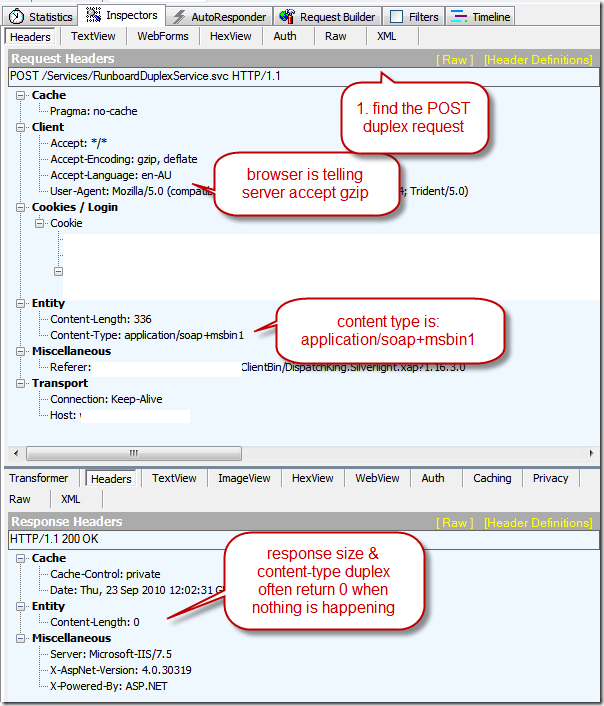
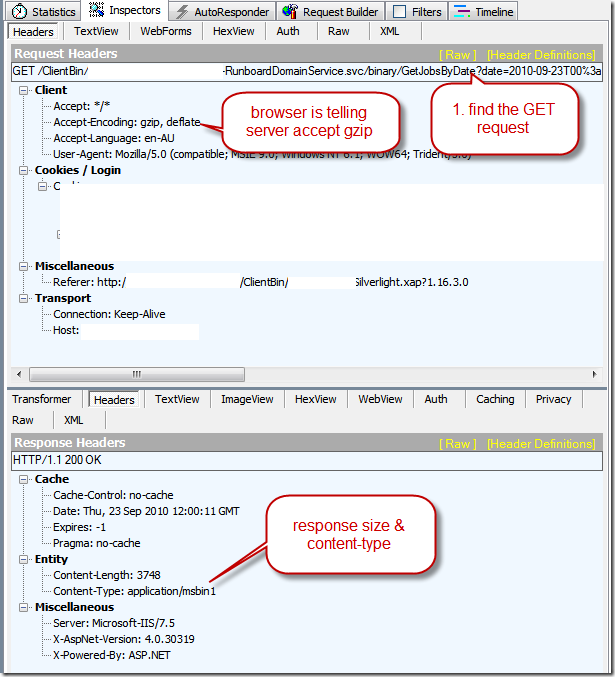
First, measure your existing service calls.  You can do this easily with Fiddler 2, which lets you watch all HTTP traffic between your browser (where the Silverlight client sits), and the server, where the Domain and Duplex services are busily responding.

image

Figure: Domain Service request call

image

Figure: Duplex service call


Enable GZIP compression on Server

Enabling GZIP compression on the server, in 3 easy steps

1. The server has to know explicitly you want to compress these new content types.

Open C:\Windows\System32\inetsrv\config\applicationHost.config  as administrator

Modify the dynamic compression section, add our two new content types

Note; the exact mimetype depends on your service binding, and whether you choose to use text encoding.  Check Fiddler data if you aren't sure.


image


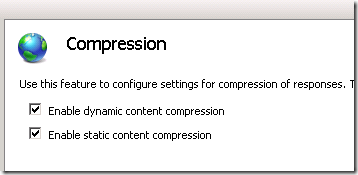
2. Enable dynamic compression via IIS on your web application

image


3. Recycle the AppPool (or the more catastrophic IISRESET, if you prefer that)


Result - test again

Refresh your Silverlight page, and let's see the new data

image

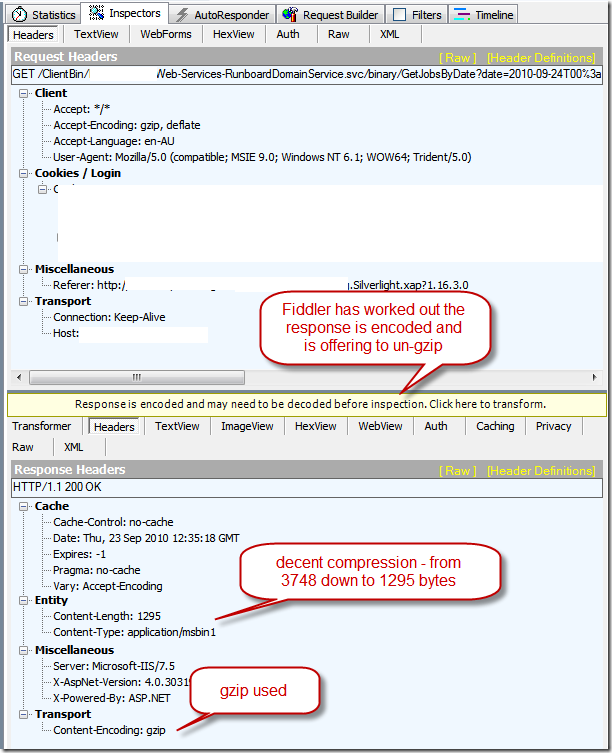
Figure: compressed domain service


image

Figure: compressed duplex service


Conclusion

I've picked a service call that's only returning 1 row of data, and it's shrunk the data size by 60%.  Over large chunks of data, I expect the compression to be significantly higher.

Smaller messages means less time for the browser to receive the response message, and since browsers already take care of compression and encoding, Silverlight doesn't even need to know that the message has arrived compressed.

Result is a small speed improvement over external sites with only a few simple steps Smile

Silverlight GeocodeLocation SerializationException when calling RouteService CalculateRoute

I was doing some geocoding via the Bingmap service, and received results of GeocodeLocation type.  I incorrectly assumed that since these GeocodeLocation inherits from the base Location class, I could just pass them back into the RouteService.

The exception is basically telling me that it doesn't know how to serialize a GeocodeLocation type, it wants just a plain Location type.


Fix:

waypoint.Description = loc.Result.DisplayName;
var geocodeLocation = loc.Result.Locations[0];
waypoint.Location = new Microsoft.Maps.MapControl.Location(geocodeLocation.Latitude, geocodeLocation.Longitude);


Note:

If you stick with the Microsoft supplied example code, you won't see this problem

private Waypoint GeocodeResultToWaypoint(GeocodeResult result)
{
    Waypoint waypoint = new Waypoint();
    waypoint.Description = result.DisplayName;
    waypoint.Location = new Microsoft.Maps.MapControl.Location();
    waypoint.Location.Latitude = result.Locations[0].Latitude;
    waypoint.Location.Longitude = result.Locations[0].Longitude;
    return waypoint;
}


(warning scary looking exception below).

{System.Runtime.Serialization.SerializationException: Type 'DispatchKing.Silverlight.GeocodeService.GeocodeLocation' with data contract name 'GeocodeLocation:http://dev.virtualearth.net/webservices/v1/common' is not expected. Add any types not known statically to the list of known types - for example, by using the KnownTypeAttribute attribute or by adding them to the list of known types passed to DataContractSerializer.
   at System.Runtime.Serialization.XmlObjectSerializerWriteContext.SerializeAndVerifyType(DataContract dataContract, XmlWriterDelegator xmlWriter, Object obj, Boolean verifyKnownType, RuntimeTypeHandle declaredTypeHandle)
   at System.Runtime.Serialization.XmlObjectSerializerWriteContext.SerializeWithXsiType(XmlWriterDelegator xmlWriter, Object obj, RuntimeTypeHandle objectTypeHandle, Type objectType, Int32 declaredTypeID, RuntimeTypeHandle declaredTypeHandle, Type declaredType)
   at System.Runtime.Serialization.XmlObjectSerializerWriteContext.InternalSerialize(XmlWriterDelegator xmlWriter, Object obj, Boolean isDeclaredType, Boolean writeXsiType, Int32 declaredTypeID, RuntimeTypeHandle declaredTypeHandle)
   at WriteWaypointToXml(XmlWriterDelegator , Object , XmlObjectSerializerWriteContext , ClassDataContract )
   at System.Runtime.Serialization.ClassDataContract.WriteXmlValue(XmlWriterDelegator xmlWriter, Object obj, XmlObjectSerializerWriteContext context)
   at System.Runtime.Serialization.XmlObjectSerializerWriteContext.WriteDataContractValue(DataContract dataContract, XmlWriterDelegator xmlWriter, Object obj, RuntimeTypeHandle declaredTypeHandle)
   at System.Runtime.Serialization.XmlObjectSerializerWriteContext.SerializeWithoutXsiType(DataContract dataContract, XmlWriterDelegator xmlWriter, Object obj, RuntimeTypeHandle declaredTypeHandle)
   at System.Runtime.Serialization.XmlObjectSerializerWriteContext.InternalSerialize(XmlWriterDelegator xmlWriter, Object obj, Boolean isDeclaredType, Boolean writeXsiType, Int32 declaredTypeID, RuntimeTypeHandle declaredTypeHandle)
   at WriteArrayOfWaypointToXml(XmlWriterDelegator , Object , XmlObjectSerializerWriteContext , CollectionDataContract )
   at System.Runtime.Serialization.CollectionDataContract.WriteXmlValue(XmlWriterDelegator xmlWriter, Object obj, XmlObjectSerializerWriteContext context)
   at System.Runtime.Serialization.XmlObjectSerializerWriteContext.WriteDataContractValue(DataContract dataContract, XmlWriterDelegator xmlWriter, Object obj, RuntimeTypeHandle declaredTypeHandle)
   at System.Runtime.Serialization.XmlObjectSerializerWriteContext.SerializeWithoutXsiType(DataContract dataContract, XmlWriterDelegator xmlWriter, Object obj, RuntimeTypeHandle declaredTypeHandle)
   at System.Runtime.Serialization.XmlObjectSerializerWriteContext.InternalSerialize(XmlWriterDelegator xmlWriter, Object obj, Boolean isDeclaredType, Boolean writeXsiType, Int32 declaredTypeID, RuntimeTypeHandle declaredTypeHandle)
   at WriteRouteRequestToXml(XmlWriterDelegator , Object , XmlObjectSerializerWriteContext , ClassDataContract )
   at System.Runtime.Serialization.ClassDataContract.WriteXmlValue(XmlWriterDelegator xmlWriter, Object obj, XmlObjectSerializerWriteContext context)
   at System.Runtime.Serialization.XmlObjectSerializerWriteContext.WriteDataContractValue(DataContract dataContract, XmlWriterDelegator xmlWriter, Object obj, RuntimeTypeHandle declaredTypeHandle)
   at System.Runtime.Serialization.XmlObjectSerializerWriteContext.SerializeWithoutXsiType(DataContract dataContract, XmlWriterDelegator xmlWriter, Object obj, RuntimeTypeHandle declaredTypeHandle)
   at System.Runtime.Serialization.DataContractSerializer.InternalWriteObjectContent(XmlWriterDelegator writer, Object graph)
   at System.Runtime.Serialization.DataContractSerializer.InternalWriteObject(XmlWriterDelegator writer, Object graph)
   at System.Runtime.Serialization.XmlObjectSerializer.WriteObjectHandleExceptions(XmlWriterDelegator writer, Object graph)
   at System.Runtime.Serialization.XmlObjectSerializer.WriteObject(XmlDictionaryWriter writer, Object graph)
   at System.ServiceModel.Dispatcher.DataContractSerializerOperationFormatter.SerializeParameterPart(XmlDictionaryWriter writer, PartInfo part, Object graph)}

MVC2 - File upload with HttpPostedFileBase


ASP.NET MVC2 makes it extremely easy to upload a file to your controller. 

Scott Hanselman blogged about this in detail

http://www.hanselman.com/blog/ABackToBasicsCaseStudyImplementingHTTPFileUploadWithASPNETMVCIncludingTestsAndMocks.aspx

The article is a bit dated, so there are a few small tweaks for MVC 2.


View

    <% using(Html.BeginForm("Upload CSV", "Customer", FormMethod.Post, new { enctype = "multipart/form-data" })){ %>
    <%: Html.ValidationSummary() %>
    
        <input type="file" id="fileUpload" name="fileUpload"/>

        <input type="submit" value="Upload file" />

    <% } %>

  • You need to use FormMethod.Post
  • You need to make sure encoding type is multipart/form-data - otherwise the server will not receive anything!
  • ValidationSummary isn't really needed, but you might want some place to throw up some errors.
  • The name of the input type="file" needs to match the argument in the controller, in my case "fileUpload"


Controller

        [HttpPost]
        public virtual ActionResult UploadCustomer(HttpPostedFileBase fileUpload)
        {
            if (fileUpload == null)
            {
                // problem
                return;
            }
            if (fileUpload.ContentLength == 0)
           {
                // problem
                return;
           }

           var reader = new StreamReader(fileUpload.InputStream);


  • The binder will automatically take the uploaded file and stick it in the HttpPostedFileBase class.
  • You can check it's status, and then grab the InputStream and read (and write out) the stream if you need to.


Gotchas


Some AJAX libraries sometimes like to hijack a Form submit.  In our case, it was turning the multipart/form-data back to application/x-www-form-urlencoded - which will not work.

If fileUpload remains null in the controller, check your Request object on the controller and see what's the encoding used on the post back.