SharePoint as Vercel for Vibe Apps
Quick Map
For
- developers who want a Vercel-style flow for internal apps
- teams in regulated or government tenants that cannot ship to Vercel
- SharePoint and Power Platform makers ready to vibe code real apps
You'll see
- How to get a git-push to live-app loop on top of SharePoint Online
- Why agentic engineering finally makes SPFx accessible to normal web devs
- Why SharePoint is the safe host when Vercel is off the table

First, what is Vercel
You may not have come across Vercel. It is a hosting platform that became the default home for modern web apps built with web frameworks like Next.js, Astro, SvelteKit, and friends. You connect a GitHub repository, and Vercel takes care of everything else - building the app, hosting it on a global CDN, attaching a domain and HTTPS certificate, and giving every pull request a unique preview URL you can share with reviewers. Other platforms in the same shape include Netlify, Cloudflare Pages, Azure SWA and AWS Amplify. The category is sometimes called “Jamstack hosting” or “frontend cloud.”
The reason Vercel feels magical is that it shortens the steps to see your app to production. You commit to the repo. The app is live. You get a URL, there’s no waiting. That loop is what made a generation of frontend developers productive. You stopped thinking about the platform, and you got to think about the app. In the era of vibe coding, it is the defacto destination for anything you want to build and ship quickly.
That freedom is also a risk for many enterprise, government and regulated organizations. You can’t ‘just vibe’ an app, and deploy it to the public cloud. We can’t risk that sort of attack surface. It’s not a validated, secure environment, your little innovation experiment can not justify the risk that your company will have to put up with.
What if, you can see SharePoint as the Vercel for internal apps. Not SharePoint as a document library, but SharePoint as an application platform.
For an internal Microsoft 365 app, you already get a lot of features for free. Identity is solved, because every user is already signed in via Microsoft 365. Permissions are solved through SharePoint groups, audience targeting, and site-level access. Audit, retention, DLP, data residency - solved. Storage for documents, structured records, generated files - solved. A fantastic REST API interface. Loads of helper methods - thumbnail, PDF. The release gate that admins use to approve new versions - solved, because it is the tenant app catalog they already manage. None of it has to be procured, configured, or explained. It is just the operating environment. And since companies already paid for SharePoint, the hosting is free. There is no cost, for your experiment.
So you just focus on your app. TypeScript. Pick React, or whatever modern JS libraries you would reach for on any other web project. Build with the SharePoint Framework (SPFx), lets you drop a real app into a SharePoint page as a web part - the user is already signed in, Microsoft Graph is one call away, and you write code the same way you would on any other frontend.
We have all the pieces. The only tricky bit is the deploy - that part has historically required someone with a bit of SPFx experience to wire up. The app catalog, the .sppkg package, the certificate-based pipeline, the web part registration on the page. Nothing exotic, but enough specialised steps that the average web developer would take a while to get to a working URL. Honestly, most modern front end developers would even say, wait this is too painful, compared to Vercel this experience is just not there.
Vibe coding changes everything. An agent can scaffold the project, fix the cert errors, untangle the manifest, write the deploy pipeline, and explain what it just did. The platform did not get easier. The path through it did. A normal worker who has never opened a .sppkg in their life can now ship a real SPFx-hosted SPA today.
So, Vercel-like magic, SharePoint-grounded safety, any developer can drive with help of an Agent.
That is the idea behind vibe-sharepoint-template. It is a SharePoint Framework 1.22.x React web part that turns a SharePoint page into a full-screen single page application host. The web part is intentionally thin. Inside it lives a normal React SPA. Outside it lives Microsoft 365. In between is a GitHub Actions pipeline that closes the loop from commit to live app.
Make the deploy magical
The Vercel feeling is not really about hosting. It is about removing every step between writing the code and seeing it live. That is the part I want to copy.
The repo ships a GitHub Actions workflow that runs on every push and does the unglamorous work for you:
1. Build the .sppkg
2. Ensure the site collection app catalog exists
3. Upload and deploy the package
4. Create or repair the host page
5. Add the web part if missing
6. Publish the page and set it as the site home
7. Verify
After the first-time setup - an Entra app registration, a certificate, the right Graph and SharePoint permissions, the deploy app granted full control on the target site app catalog - the inner loop collapses to: edit React, push, refresh the page. The README walks the setup end-to-end so you only do it once.
That is the piece I want to feel magical. From the developer’s seat, this is just a normal modern web project with a CI pipeline. From the admin’s seat, it is a versioned .sppkg landing in the app catalog with a full audit trail and a kill switch.
What agentic engineering specifically unlocks
Vibe coding really speeds up this development process in two noticeable ways. First, it can help with fixing existing errors or build new features quickly.
Second, it really helps setting up the deployment pipeline, so you can have a magical experience every time.
That is what changes which apps make sense to build this way. The frontier moves from “SPFx specialist on the team” to “any developer with a good agent.”
Two quick vibe-coded examples
To test the idea, I asked an agent to build two small sites on top of the template.
The first was a platform-style landing page for the template itself. It needed to look and feel like a modern product site, but the important part was that it was still just a React app running inside a SharePoint page.
“Create a modern landing page for a SharePoint-hosted internal app called Vibe SharePoint. It should feel like Vercel, explain that SPAs can be deployed safely to SharePoint, and show a commit-to-deploy platform story. Use a polished SaaS style with navigation for Platform, Workloads, Developers, and vs Vercel.”
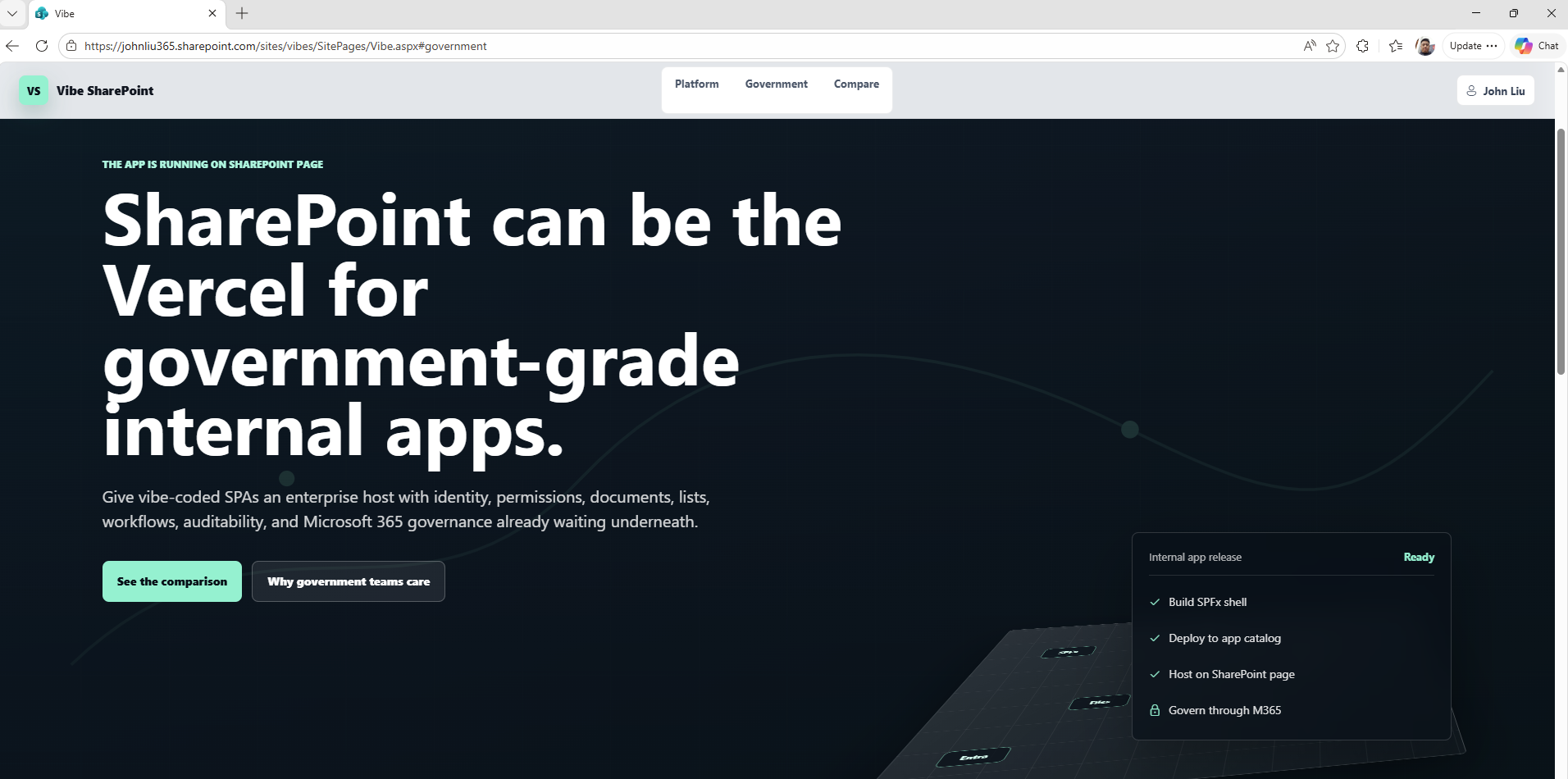
The second was a more visual, interactive variant. Same app shell, different design language. I wanted to see how far the agent could push the front-end while the platform story underneath stayed exactly the same.
“something that looks like the new homepage of stripe - interactive, but still talking about SharePoint is like an application platform, like Vercel”
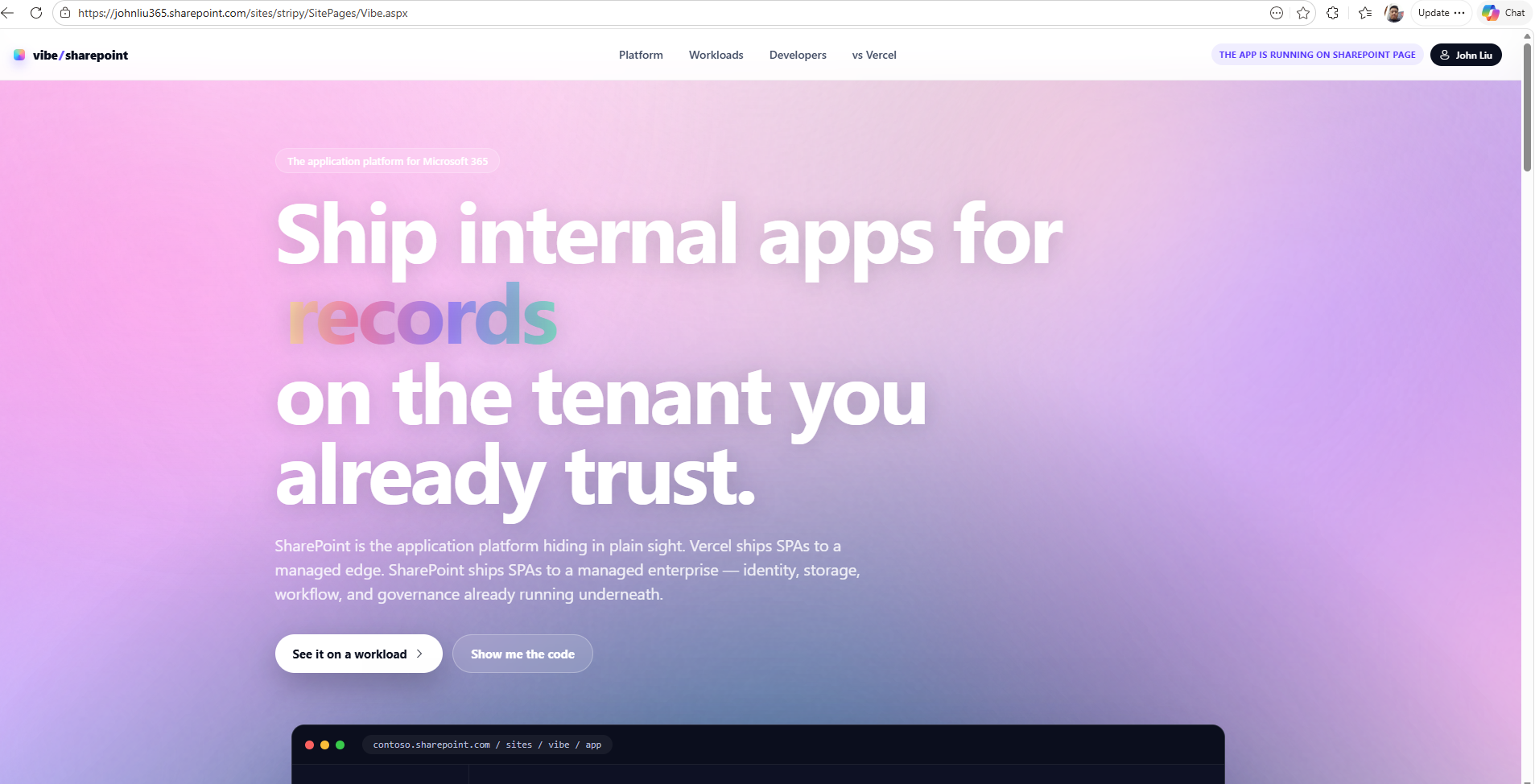
Both examples are deliberately small. The point is not that the design is perfect. The point is that the loop works: describe the app, let the agent build the React experience, commit it, and the pipeline lands it safely on a SharePoint page.
Why this matters for regulated tenants
The other reason this is interesting: a lot of organisations cannot use Vercel at all.
Government departments, banks, hospitals, anything with a serious procurement and security review process - getting approval to send internal data to a new third-party hosting platform is not a weekend job. It is a multi-month exercise in cost approvals, data residency questions, supplier risk assessments, and a lot of meetings. For most internal line-of-business apps, the answer quietly becomes “do not bother.”
SharePoint Online is the opposite. Microsoft 365 is already approved. The data is already there. Identity, permissions, audit, retention, DLP, the tenant app catalog as a release gate - all of that is already accepted by the same team that would otherwise be writing the security questionnaire for a new vendor. Deploying an SPFx package into a site app catalog is, from the admin’s perspective, the same shape of action they already approve every week.
So the trade is: you give up the trendiest deploy target, and in return you get a host that ships through the front door in environments where Vercel will not even make it past procurement.
What the web part actually does
The web part is not the app. The web part is the shell.
User
  -> SharePoint Page (single-part app page, full-width)
  -> SPFx Web Part (shell)
  -> React SPA
  -> SharePoint REST / Microsoft Graph / Power Automate / Azure Functions
  -> SharePoint Lists and Libraries
The page is set up as a SingleWebPartAppPage (this is a specific SharePoint layout page explicitly available for this very need). The web part takes the full viewport. The React app inside owns routing, layout, state, and the user workflows. SharePoint is the platform boundary. It owns identity, authorization, storage, documents, compliance, and lifecycle.
The host page is SitePages/Vibe.aspx and we set it as the site home page. We also inject a small piece of CSS to hide the SharePoint chrome on this specific page so the app feels like an app, not a page with an app on it. You can also choose to keep any of it, perhaps the SuiteNavWrapper, so users can navigate across to other M365 Apps.
#sp-appBar,
#spCommandBar,
#spSiteHeader,
#SuiteNavWrapper
A user lands on the site, does not need to signs in, and sees the React app full-screen. They never realise they are inside SharePoint. But the IT admin still sees a SharePoint site, with a SharePoint app catalog, with a versioned .sppkg package, with the same governance they already use for everything else.
Where each thing belongs
In a full Vercel install, you do have the backend API that you can run some server side things, hide secrets or connect to other sources. In the SharePoint world, we need to plan a bit.
- Browser SPA: UI, routing, state, calls to Graph and SharePoint REST that the signed-in user is allowed to make.
- SharePoint lists: structured business data that benefits from permissions, versioning, and an admin who already knows how to manage it.
- SharePoint libraries: files, generated PDFs, exports, anything that should sit alongside the rest of the team’s documents.
- Microsoft Graph: people, groups, mail, calendar, files across M365.
- Power Automate or Azure Functions: anything that needs secrets, elevated permissions, retries, or runs longer than a click. You may want to secure these with O365 login, so you’ll need to pass along a bearer token before they will activate.
- Site Collection app catalog: the release gate. New version of the app means a new
.sppkgdeployed to the catalog. Reversible. Visible. Familiar to the admin.
Nothing here is exotic. That is the point. Each piece is something a Microsoft 365 tenant already runs.
Looking back
I had a funny moment writing this, because I have been circling this same idea for a long time.
Back in September 2016, that’s nearly 10 years ago! When SPFx was just arriving, I wrote about preparing your toolbox for the SharePoint Framework, originally for Telerik. That was before SPFx had settled into the thing we know now. We were still working out Angular, Webpack, Kendo UI, Office UI Fabric, and what a modern SharePoint developer stack was even supposed to look like.
We have come a long way since then. SPFx is real. The Microsoft 365 platform is much deeper. The JavaScript ecosystem has moved several times over. And now agents can do a lot of the scaffolding, debugging, and pipeline wiring that used to separate SharePoint specialists from normal web developers.
But I think the underlying bet was right: building on top of SharePoint still makes a lot of sense for a lot of people. The reason is practical. It is because the platform already owns identity, files, lists, permissions, and the organizational trust boundary. If you can bring the modern app vibe-coded experience and the magical deploy-loop to that surface, you get something genuinely useful.
Vibe code the app, ship it safely
The thing I actually want from all of this is the freedom to vibe code an internal app the same way I would vibe code a side project. Open the editor, describe the feature, let the agent build it, refresh the page, iterate. A modern UI, fast, reactive, the kind of thing the business has been quietly jealous of for years while they used a clunky internal portal.
What changes here is the landing pad. The same loose, fast, agent-driven build loop ends with a .sppkg in the tenant app catalog instead of an unknown URL on someone else’s infrastructure. The app feels modern to the user. It feels safe to the admin. Nobody has to choose between those two things.
It is not the right answer for every app. Anything customer-facing, public-facing, there’s no anonymous, anything that needs heavy custom infrastructure, anything that should not depend on Microsoft 365 being available, those still want a different home. But for the long tail of internal line-of-business apps that today get built as scrappy half-finished portals, or yet another standalone web app with its own auth, this is a real alternative - and in regulated tenants, often the only realistic alternative.
The repo is here if you want to read the code or copy the deployment pipeline: johnnliu/vibe-sharepoint-template.
SharePoint is best host, that you already have. When the platform underneath is already doing the hard parts and the deploy loop on top finally feels magical.
Discussions