UserCustomAction-ConfigPage adding CSS file links
I’ve had several questions in comments about how to add CSS files using the Simplest-Safest-Most-Future-Proof-Way to customize your SharePoint and SharePoint Online using UserCustomActionConfigPage
This is something I wanted to talk about from day 1 of this series - as I did cover you can add more than 1 CSS files, and specify their ranking via the Sequence number.
Because UserCustomAction doesn’t create a link for CSS references, the way to do this is via the ScriptBlock and create a LINK element and attach it on page creation.
How to use this?
Grab the latest configure-page.aspx from Github.
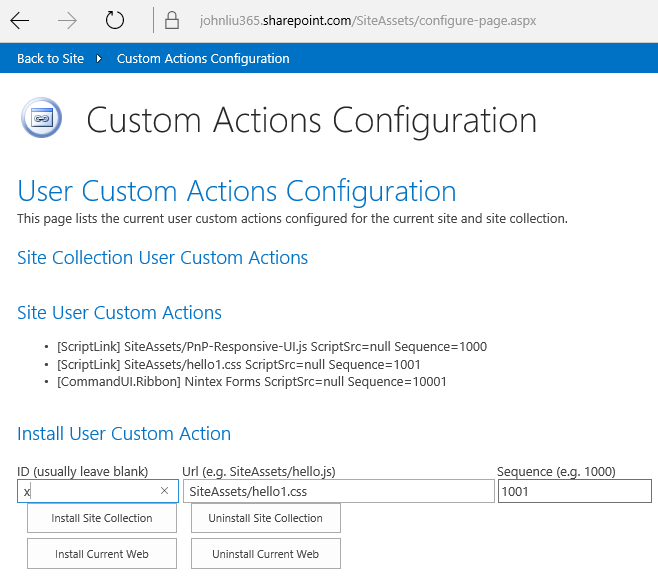
Reference a CSS file instead of a JS file. The ID is optional, but will be respected if specified.

The Sequence is honoured - 1001 will follow 1000.
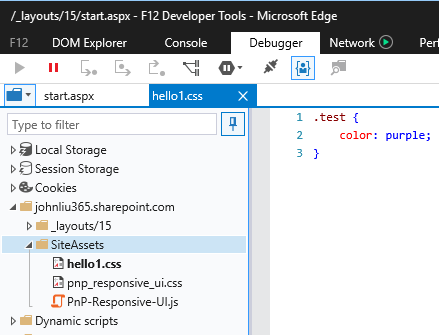
Result - the CSS reference is loaded into the page.
Happy branding!
Featured
Mar 15, 2016
UserCustomAction-ConfigPage adding CSS file links
Mar 15, 2016
Mar 15, 2016
Mar 10, 2016
SP2013/2016 Responsive-UI and UserCustomActionsConfigPage
Mar 10, 2016
Mar 10, 2016
Jan 24, 2016
Publishing UserCustomActionConfigPage on GitHub
Jan 24, 2016
Jan 24, 2016
Dec 23, 2015
The easiest way to add Script and Brand your SharePoint and SharePoint Online
Dec 23, 2015
Dec 23, 2015
Discussions