Silverlight - RadScheduler and required field data validation
In my current project I’m having the pleasure of working with the Silverlight RadScheduler control. While you may read and feel it is a very bloated control, I argue otherwise, it is highly extensible for such a complex control. I really think the Telerik guys did a very good job.
My particular scenario is interesting. I need to:
- Extend the appointment dialog to support addresses
- The addresses aren’t always required (so I can’t just use RequiredAttribute)
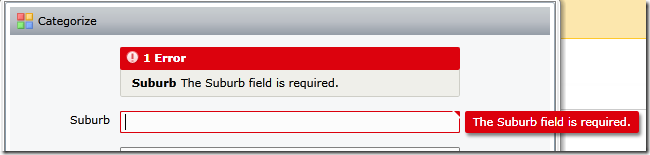
- When fields are required, I’d like the validation to kick off and prevent me from saving that appointment
Here we go:
Updating the RadScheduler template:
This is pretty simple - find the EditAppointmentTemplate
<ControlTemplate x:Key=“EditAppointmentTemplate” TargetType=“telerik:AppointmentDialogWindow”>
- Customize the control template, we added additional fields
- NotifyOnValidationError and ValidatesOnException are important.
..snip
      <input:ValidationSummary x:Name\="ValidationSummary" />

      <TextBlock Text\="Suburb" Style\="{StaticResource FormElementTextBlockStyle}"/>
      <TextBox Text\="{Binding Suburb, Mode=TwoWay, NotifyOnValidationError=True, ValidatesOnExceptions=True}"  />
Extend the Appointment class:
-
Create a ValidationEnabled property - sometimes you need to “not validate”
-
Create a ValidateProperty method - this takes a property name and triggers all validate attributes on that property - Validator.ValidateProperty is the method that will trigger all kinds of fun validation exceptions for us.
-
Set the appropriate validation attributes on the property e.g. Suburb - I’m using a custom validation property that I’ve created based on the RequiredAttribute
-
In the setter, call ValidateProperty.
public class JobAppointment : Appointment { private string _suburb;
public ObservableCollection<ValidationError> Errors { get; set; }

public bool ValidationEnabled
{
    get;
    set;
}

private void ValidateProperty(string propertyName, object value)
{
    if (ValidationEnabled)
    {
        var context = new ValidationContext(this, null, null);
        context.MemberName = propertyName;

        Validator.ValidateProperty(value, context);
    }
}

\[ValidationRequired\]
public string Suburb
{
    get
    {
        return \_suburb;
    }
    set
    {
        ValidateProperty("Suburb", value);

        if (\_suburb != value)
        {
            \_suburb = value;
            OnPropertyChanged("Suburb");
        }
    }
}
Add our own Validation attributes
- This Required attribute checks against our settings to see if “Suburb” happens to be a required field. If not, then skip the validation and just return success.
public class ValidationRequiredAttribute : RequiredAttribute { protected override ValidationResult IsValid(object value, ValidationContext validationContext) { if (SettingsLifeTimeService.Current != null ) { if (SettingsLifeTimeService.Current.RequiredFields.Contains(validationContext.MemberName)) { // RequiredAttribute validation return base.IsValid(value, validationContext); } } return ValidationResult.Success; } }
Stop validation on Scheduler’s Appointment_Saving event
- In the AppointmentSaving event, grab all the children framework elements from the appointment dialog window
- Find their binding expression (e.g., for TextBox I want the binding expression for Textbox.Text)
- If exists, I want it to push the values back into the datasource (our customized Appointment class) - this triggers the property setter (which triggers our ValidateProperty, which triggers the custom Required attribute)
- Finally, check the validation summary to see if we have any binding errors, if we do, cancel the save.
void _scheduler_AppointmentSaving(object sender, AppointmentSavingEventArgs e)
{
JobAppointment jobApp = e.Appointment as JobAppointment;
AppointmentDialogWindow window = e.OriginalSource as AppointmentDialogWindow;
var children = window.ChildrenOfType
        if (children != null)
        {
            foreach (var element in children)
            {
                BindingExpression binding = null;
                if (element is TextBox)
                {
                    binding = element.GetBindingExpression(TextBox.TextProperty);
                }

                if (binding != null)
                {
                    // force control to update databound VM.  This triggers the validation.
                    binding.UpdateSource();
                }
            }
        }

        ValidationSummary summary = window.FindChildByType<ValidationSummary>();

        if (summary != null)
        {
            if (summary.HasErrors)
            {
                e.Cancel = true;
                return;
            }
        }
    }
Finished!
Discussions