Flow Studio Security Architecture Review
Flow Studio and Flow Studio MCP - Security and Architecture Review
Last updated: 2026-05-15
Audience: Enterprise InfoSec and Architecture review
Owner: Flow Studio Solutions
Executive summary
Flow Studio products connect to Microsoft Power Platform using Microsoft Entra authentication and delegated Microsoft API permissions. Flow Studio does not receive Microsoft passwords and does not store connector secrets.
There are three related product surfaces:
| Surface | Purpose | Primary data path | Storage model |
|---|---|---|---|
| Flow Studio App | Browser app for viewing, managing, and debugging Power Automate flows | User browser to Microsoft Power Platform APIs | Browser cache plus Flow Studio service metadata |
| Flow Studio for Teams | Team view for flow/app inventory, monitoring, and run history | Scheduled or user-initiated scans through Flow Studio server functions | Azure Storage tables/blobs, either Flow Studio-managed or customer-provided |
| Flow Studio MCP | MCP server for AI agents working with Power Automate | Agent to Flow Studio MCP to Microsoft Power Platform APIs | Mostly pass-through; stores account, usage, and tool-call logs |
| Flow Studio Governance | Tenant-wide governance, maker analytics, compliance scoring, and audit reporting | Scheduled or user-initiated scans through Flow Studio server functions | Azure Storage tables/blobs, either Flow Studio-managed or customer-provided |
Permissions required
Microsoft sign-in
Flow Studio uses Microsoft Entra ID for authentication.
| Permission | Why it is needed | Notes |
|---|---|---|
openid, profile, email | Sign the user in and identify the account | Used by the web app/auth layer |
| Tenant ID and object ID claims | Bind the account to the correct tenant/workspace | Used for tenant isolation and access checks |
offline_access | Maintain delegated access after explicit consent | User/admin can revoke consent in Microsoft |
Power Platform delegated permissions
These are requested only when the user grants Power Platform access.
| Scope | Used by | Purpose |
|---|---|---|
https://service.flow.microsoft.com//Flows.Read.All | App, Teams, MCP | Read Power Automate flow metadata and definitions where the user/service account has access |
https://service.flow.microsoft.com//Flows.Manage.All | App, Teams, MCP | Manage flows, including update, enable/disable, trigger, resubmit, or repair actions when invoked |
https://service.flow.microsoft.com//Activity.Read.All | App, Teams, MCP | Read flow activity/run metadata |
https://service.flow.microsoft.com//Approvals.Read.All | App/Teams where enabled | Read approval metadata |
https://service.flow.microsoft.com//Approvals.Manage.All | App/Teams where enabled | Manage approvals where the user has rights |
https://service.powerapps.com/User | App/Teams/MCP setup | Read Power Apps/Power Platform user context and app inventory where enabled |
https://api.powerplatform.com/.default | Newer Power Platform API paths | Read tenant/environment/flow endpoints exposed by the Power Platform API |
https://manage.office.com//ActivityFeed.Read | Governance audit features | Read Microsoft 365 activity feed events for governance reporting |
https://graph.microsoft.com/user.readbasic.all | Governance maker enrichment | Resolve basic user profile fields for maker/owner identification |
Permissions not requested for MCP
Flow Studio MCP does not request mailbox, calendar, OneDrive, SharePoint file, Teams chat, or broad Microsoft Graph content scopes for the agent request path.
Data accessed
| Data class | Examples | Scope |
|---|---|---|
| Account identity | Name, email, Entra tenant ID, Entra object ID | Current signed-in user and service accounts connected by the customer |
| Subscription and entitlement | Plan, call limit, billing period, Stripe customer/subscription IDs | Flow Studio account/workspace |
| Power Platform environment inventory | Environment IDs, names, region/type where available | Tenant/workspace, based on granted access |
| Power Automate flow metadata | Flow IDs, names, state, owner/team metadata, trigger/action structure, connector references | Flows visible to the delegated account or admin/service account |
| Power Automate run metadata | Run ID, status, start/end time, failed action names, error codes/messages | Monitored or requested flows |
| Action input/output payloads | Runtime inputs/outputs exposed by Power Automate action blob links | MCP only when the user/agent explicitly asks to inspect a run action, this is not stored or logged |
| Connection inventory | Connector names, connection references, connection IDs, owner metadata where available | Used for diagnostics, governance, and flow repair |
| Maker metadata | Basic user display fields, ownership counts, governance role mapping | Governance reporting |
| Governance metadata | Business impact, owner team, support group, monitoring flag, tags, scores | Customer workspace |
Data not accessed or not stored
| Data | Position |
|---|---|
| Microsoft passwords | Never received by Flow Studio |
| Connector secrets | Not stored by Flow Studio |
| Mailbox/calendar/file contents | Not requested for MCP and not part of the standard Power Automate MCP scope set |
| Payment card data | Handled by Stripe; Flow Studio does not receive card number/CVV |
| Runtime action payloads | Not stored as routine product data; MCP can fetch them transiently when explicitly requested for debugging |
Data stored
Flow Studio App
| Stored item | Location | Purpose |
|---|---|---|
| Browser cache/preferences | Browser cache/OPFS | Faster UI, local filtering, recent selections |
| Account/license metadata | Flow Studio backend | Access control and entitlement checks |
| Optional cached flow/run data | Browser cache/OPFS | Local app performance and offline-style repeat viewing |
Flow Studio for Teams / Governance
| Stored item | Location | Purpose |
|---|---|---|
| Customer/workspace mapping | Azure Table Storage | Resolve the authenticated user to a workspace |
| Microsoft refresh tokens | Azure Storage token table, protected by Azure platform encryption at rest | Obtain delegated Power Platform access tokens after consent |
| Environments | Azure Table Storage | Inventory and filtering |
| Flows and Power Apps metadata | Azure Table Storage | Governance, search, reporting |
| Runs and failure metadata | Azure Table Storage | Monitoring, failure trends, diagnostics |
| Makers/users basic metadata | Azure Table Storage | Ownership and governance reporting |
| Connections/connectors | Azure Table Storage | Dependency and risk reporting |
| Governance fields | Azure Table Storage | Business impact, owner team, support and compliance views |
| CSV/report exports or debug blobs where configured | Azure Blob Storage | Customer reporting and support diagnostics |
Flow Studio MCP
| Stored item | Location | Purpose |
|---|---|---|
| Customer/workspace mapping | Azure Table Storage | Resolve the authenticated user to a workspace |
| API key or key metadata | Azure Table Storage | Allow MCP clients to authenticate |
| Microsoft refresh tokens | Azure Storage token table, protected by Azure platform encryption at rest | Obtain delegated Power Platform access tokens after consent |
| Entitlements | Azure Table Storage and Stripe | Plan limits and access control |
| MCP usage counts | Azure Table Storage | Billing/limits |
| MCP action logs | Azure Table Storage | Usage metering, security review, support diagnostics |
| Connector hints | Azure Table Storage | Improve agent guidance for connector/action authoring |
| Update-flow debug logs | Azure Blob Storage | Troubleshoot failed flow update/create calls |
MCP action logs record metadata such as tool name, timestamp, user ID, tenant ID, workspace, status, duration, and error message. They are not intended to store full flow definitions, connector secrets, or run payload bodies.
Data transferred
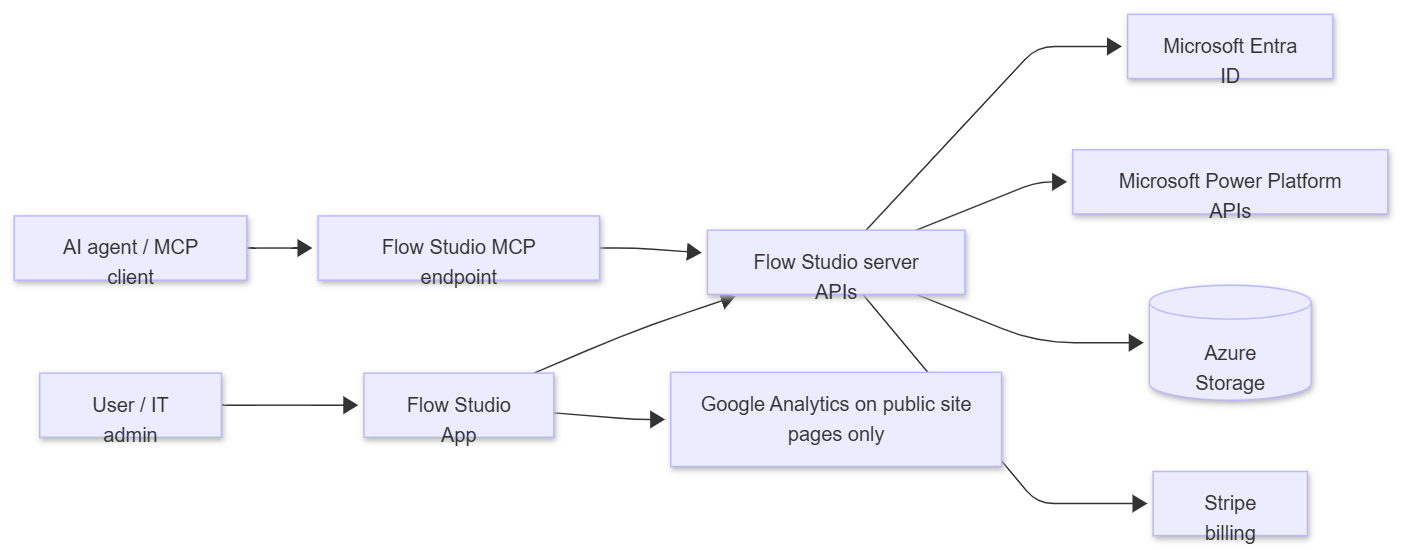
| Transfer | Data | Notes |
|---|---|---|
| Browser to Microsoft Entra | Login/authentication | Microsoft handles credentials |
| Browser/server/MCP to Power Platform APIs | Delegated API calls | Subject to Microsoft tenant policies, DLP, RBAC, and the consented account’s rights |
| Flow Studio server to Azure Storage | Product metadata, logs, tokens, usage | Storage can be Flow Studio-managed or customer-provided for Teams/governance workspaces |
| Flow Studio site/server to Stripe | Billing/subscription metadata | Card data remains with Stripe |
| Public marketing/docs pages to Google Analytics | Page views and basic site events | Not used in MCP JSON-RPC agent traffic |
External systems and subprocessors
| System | Purpose | Data involved |
|---|---|---|
| Microsoft Azure | Hosting, functions, storage, monitoring — regions: Australia East (primary), West US, West Europe / Germany West Central | Service data, operational logs, stored metadata |
| Microsoft Entra ID | Authentication and delegated OAuth consent | Identity claims and OAuth tokens |
| Microsoft Power Platform APIs | Product data source and action target | Flow/app/environment/run/connector data |
| Stripe | Subscription billing | Billing email, customer/subscription IDs, payment status |
| Google Analytics 4 | Public site analytics | Page/event analytics on public web pages only |
| HubSpot or email platform, if used | Product/support communications | Name and email for opted-in communications |
Flow Studio does not sell customer data.
Bring Your Own Azure Storage
Customers can use their own Azure Storage account for Flow Studio for Teams / Power Clarity workspace data.
Setup model
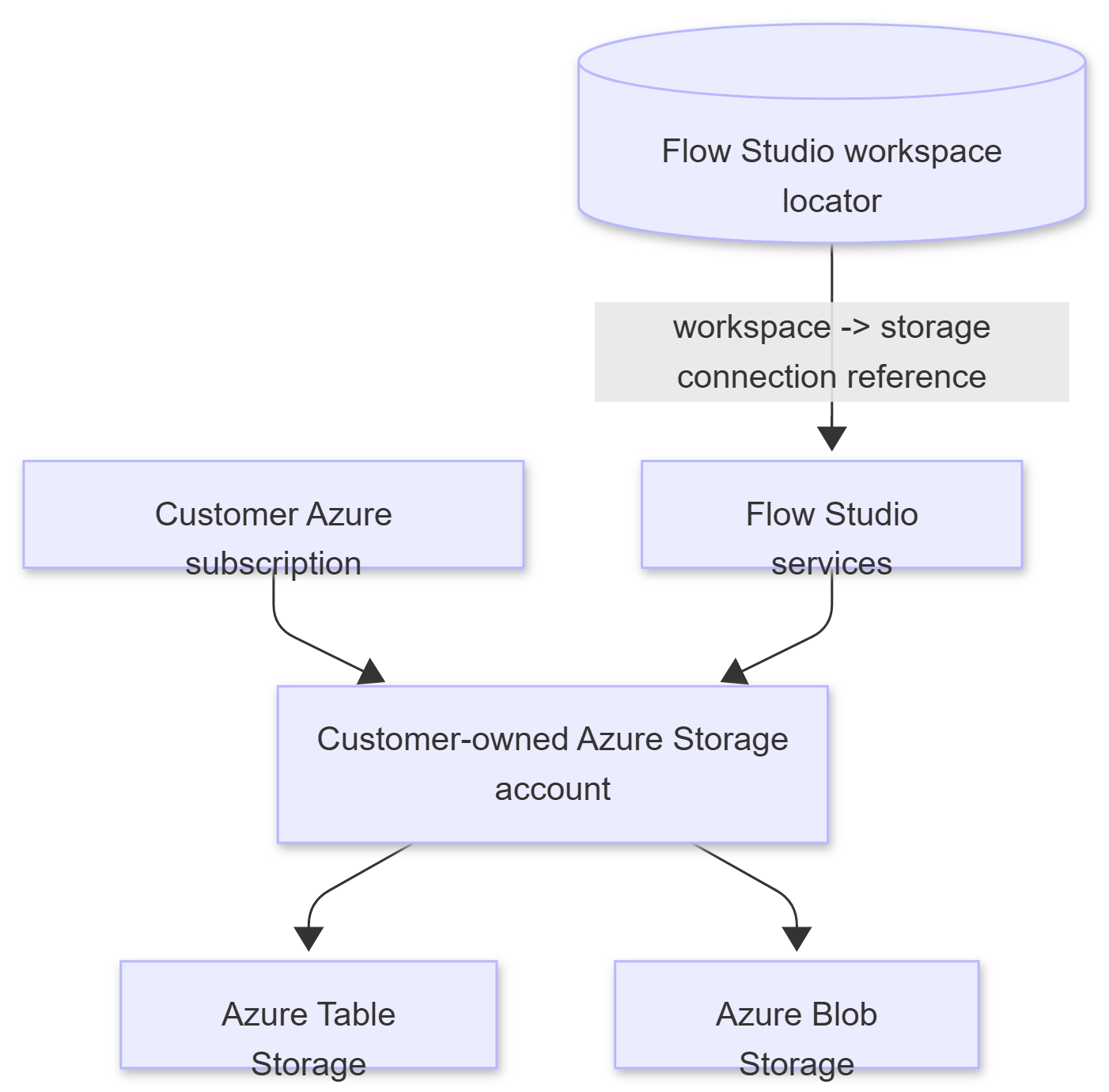
Flow Studio stores a workspace-to-storage mapping in its central registry. Product data for that workspace is written to the customer-owned storage account.
Customer requirements
| Requirement | Detail |
|---|---|
| Azure Storage account | General-purpose v2 storage account with Azure Table Storage and Blob Storage available |
| Network access | Flow Studio services must be able to reach Table and Blob endpoints. If private endpoints/firewalls are required, allow the Flow Studio function outbound path agreed during setup |
| Authentication method | Storage connection string or equivalent SAS/credential with required table/blob permissions |
| Permissions needed | Create/read/update/delete table entities; create/read/write blobs and containers used for exports/debug logs |
| Security baseline | HTTPS only, TLS 1.2+, encryption at rest enabled, customer-managed keys optional if required by the customer |
| Lifecycle | Customer owns storage account lifecycle, retention policies, backup/replication choices, and deletion controls |
Typical tables/containers
The exact set depends on enabled modules, but common tables include:
| Table/container | Purpose |
|---|---|
gEnvs | Power Platform environments |
gFlows | Power Automate flow metadata and governance fields |
gRuns | Flow run metadata and failure details |
gApps | Power Apps metadata |
gMakers | Maker/user summary metadata |
gConnections | Power Platform connection inventory |
gConnectors | Connector catalog/inventory |
gRules, gScans | Monitoring rules and scan state |
gAccounts / AccountTokens | Connected service account/token records where configured |
Blob containers such as clarity or debug containers | CSV exports and support/debug artifacts where enabled |
BYOS setup steps
- Customer creates or nominates the Azure Storage account.
- Customer confirms network controls and whether public endpoint, firewall allowlisting, or private endpoint access is required.
- Customer provides a least-privilege connection method to Flow Studio through the agreed secure channel.
- Flow Studio registers the workspace-to-storage mapping.
- Flow Studio runs a test scan and verifies tables/blobs are created and written.
- Customer validates storage account logs, data residency, backup, and retention settings.
FAQ
Does Flow Studio store Microsoft passwords?
No. Authentication is handled by Microsoft Entra ID.
Can customers use their own Azure Storage?
Yes. Flow Studio can write Teams/governance workspace data to customer-owned Azure Storage.
Does MCP store flow definitions?
Starter/Pro MCP calls are primarily pass-through. Flow definitions are not stored as routine MCP product data. Some paid monitoring/governance features can cache selected flow metadata when enabled.
Does MCP store run payloads?
No run payload storage. MCP can fetch action inputs/outputs transiently when the user/agent explicitly asks for run debugging.
Can Flow Studio modify flows?
Yes, where the consented account has rights and the user/agent invokes a management tool. Examples include update, enable/disable, trigger, cancel, resubmit, or add to solution.
What is a Flow Studio workspace?
A workspace is an isolation bucket within a tenant. One or more users in the same group share a workspace to review and manage monitoring together. Within the same tenant, multiple workspaces can exist — for example, different teams monitoring different projects independently. It is also possible to monitor multiple tenants (such as separate dev and prod tenants) within a single workspace. Multi-tenant workspace configuration is available by request.
Each workspace has an associated Azure Storage account for storing flow, run, and governance data. This storage can be auto-provisioned and managed by Flow Studio, or customers can bring their own Azure Storage account (BYOS).
Are calls tenant-isolated?
Yes. Records are partitioned by tenant/workspace identifiers, and API calls resolve the authenticated identity before accessing workspace data.
Can access be revoked?
Yes. Microsoft consent can be revoked from Microsoft, and Flow Studio API keys/tokens can be removed from the dashboard/service.
Are external AI models used by Flow Studio MCP?
No. Flow Studio MCP is an API/tool layer. The AI agent chosen by the customer calls MCP; Flow Studio does not run a server-side LLM for these requests.
Does Flow Studio bypass Microsoft DLP or RBAC?
No. Calls are made through Microsoft APIs using delegated access and remain subject to the tenant’s Microsoft controls.
What happens if the subscription ends?
Access is removed. Stored data is deleted on request or during account/workspace offboarding according to the agreed process and applicable recordkeeping obligations.
Discussions